

Apple released iOS 27.0.1 on Monday, September 28, 2026, with matching 27.0.1 updates for iPadOS, macOS Golden Gate, watchOS and visionOS. The headline fix is for iPhone 18 Pro models that could reboot when Face ID failed. The security news sits elsewhere: updates for older systems patch a CoreGraphics bug that Apple says may have been exploited.
TL;DR
- iOS 27.0.1 (build 24A446) is a bug-fix release. Apple lists three fixes, two of them only for iPhone 18 Pro models, and its security page shows no published CVE entries for it.
- The security patch went to the older lines. iOS and iPadOS 26.7.1, macOS Tahoe 26.7.1 and macOS Sequoia 15.8.1 fix CVE-2026-86950, a CoreGraphics flaw Apple says may have been exploited in a targeted attack.
- Everything else is “bug fixes.” macOS Golden Gate 27.0.1 and iPadOS 27.0.1 carry one-line “bug fixes” notes; watchOS 27.0.1 cites a restart fix; no itemized visionOS notes were found. tvOS stays at 27.
What happened
Apple’s security releases index has seven entries dated September 28: iOS and iPadOS 27.0.1, iOS and iPadOS 26.7.1, macOS Golden Gate 27.0.1, macOS Tahoe 26.7.1, macOS Sequoia 15.8.1, watchOS 27.0.1 and visionOS 27.0.1. The four 27.0.1 entries have no published CVE entries. tvOS remains at 27.
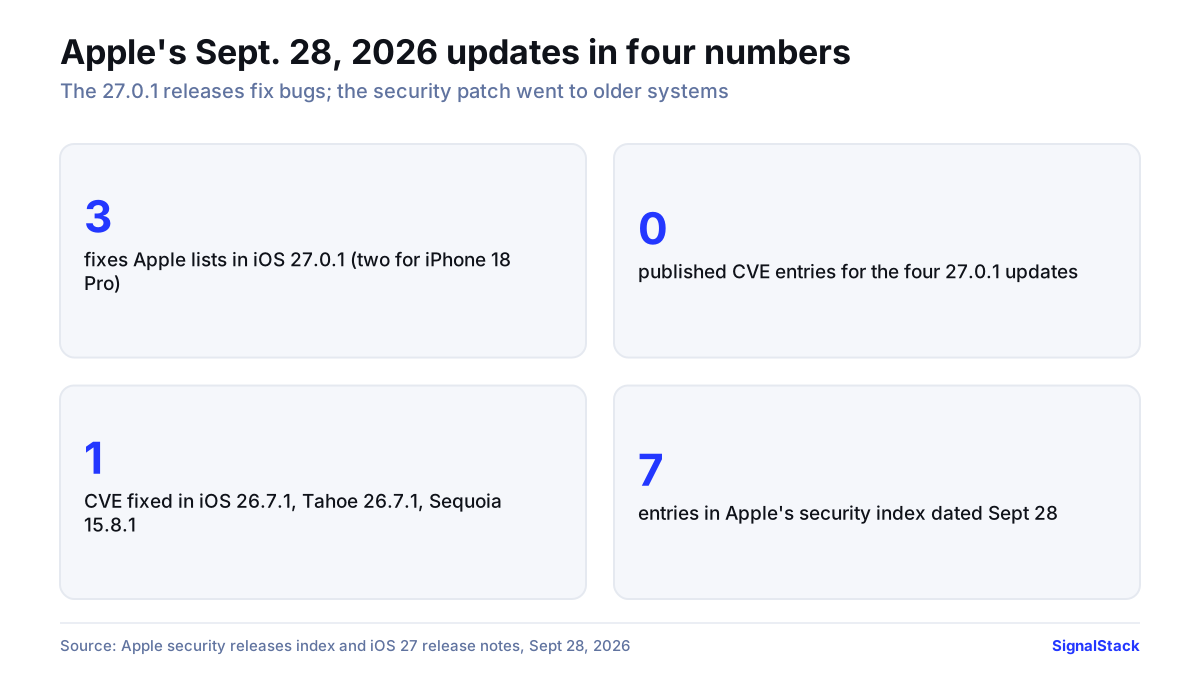
What Apple’s release notes say, by platform
For the iPhone, Apple’s “About iOS 27 Updates” page lists three problems fixed in 27.0.1:
- Face ID restarts. On the iPhone 18 Pro and Pro Max, a failed Face ID attempt could make the phone restart on its own.
- Camera color artifact. On “a small number” of iPhone 18 Pro and Pro Max units, photos shot at 2x with the f/1.48 aperture could show a color artifact in some lighting.
- Frozen touchscreen. On any iPhone running iOS 27, opening Notification Center and Control Center at the same moment could leave the screen unresponsive to touch.
As 9to5Mac points out, only the third item applies to every model.
| Update | Build | What Apple says it changes | Published CVEs | Devices (per Apple) |
|---|---|---|---|---|
| iOS 27.0.1 | 24A446 | The three fixes above | None | iPhone 11 and later |
| iPadOS 27.0.1 | 24A446 | General bug fixes | None | iPad Pro 12.9-inch 4th gen+, iPad Pro 11-inch 2nd gen+, iPad Air 4th gen+, iPad 9th gen+, iPad mini 6th gen+ |
| macOS Golden Gate 27.0.1 | 26A434 | General bug fixes | None | Macs running Golden Gate (Apple silicon only) |
| watchOS 27.0.1 | 24R365 | Bug fixes, including unexpected restarts | None | Apple Watch Series 9 and later |
| visionOS 27.0.1 | 24M372 | No itemized notes found | None | Apple Vision Pro (all models) |
| iOS / iPadOS 26.7.1 | 23H30 | Security fix | CVE-2026-86950 | iPhone 11+, plus iPads back to iPad 8th gen and iPad mini 5th gen |
| macOS Tahoe 26.7.1 | 25G241 | Security fix | CVE-2026-86950 | Macs on Tahoe |
| macOS Sequoia 15.8.1 | 24H32 | Security fix | CVE-2026-86950 | Macs on Sequoia |
Build numbers are as reported by iClarified, AppleInsider and Mr. Macintosh; Apple’s security pages don’t list them.
Apple Watch. Apple’s index shows watchOS 27.0.1 first went out on September 23, only to Series 12 and Ultra 4, and reached all watchOS 27 models on September 28. 9to5Mac reports the notes and build are unchanged; they mention a fix for unexpected restarts.
Mac. Mr. Macintosh found one specific Golden Gate 27.0.1 item in Apple’s enterprise notes: Platform SSO sign-in fields missing from the Lock Screen after sleep. The update also moves Safari to 27.0.1.
The security content: one CVE, older systems only
Apple’s pages for iOS 26.7.1, macOS Tahoe 26.7.1 and macOS Sequoia 15.8.1 each describe the same single issue:
- Component: CoreGraphics, Apple’s 2D graphics framework.
- Impact: a maliciously crafted file, once processed, may lead to arbitrary code execution.
- Cause and fix: an out-of-bounds write, now blocked with better bounds checking.
- Exploitation: Apple’s note reads: “Apple is aware of a report that this issue may have been exploited in an extremely sophisticated attack against specific targeted individuals on versions of iOS before iOS 27.”
- Credit: Meta Product Security.
The Mac pages repeat the iOS wording, so Apple has not said whether any Mac was attacked. CVE-2026-86950 is absent from Apple’s iOS 27 security document, and Apple doesn’t say why; MacRumors reads this as the latest systems not appearing to be affected.
There was no iOS 18 update on September 28. The last one in Apple’s index is iOS 18.7.10 on August 17, for the iPhone XS, XS Max, XR and iPad 7th generation, and while Apple’s wording covers versions before iOS 27, no iOS 18 update was listed.
Background: why iOS 26 still gets patches
Apple has kept shipping iOS 26 updates next to iOS 27. Our count of Apple’s September 14 security documents found 126 CVE entries in iOS 27 and 82 in iOS 26.7, with 75 in both. The device lists explain why. iPadOS 26.7.1 covers the iPad Pro 12.9-inch 3rd generation, iPad Pro 11-inch 1st generation, iPad Air 3rd generation, iPad 8th generation and iPad mini 5th generation, none of which are on the iPadOS 27 list, so 26.7.1 is their only route to the fix. On iPhone, both lines start at the iPhone 11.
The Face ID bug surfaced right after launch. Apple showed the iPhone 18 Pro at its September 9 event, and phones began reaching buyers on Friday, September 18. On September 21, MacRumors reported that failed Face ID checks, such as when opening a locked app, could freeze the phone, which then rebooted to the Lock Screen. The 18 Pro moves the Face ID infrared camera under the display; MacRumors said it was unclear whether that was involved. On September 24, it reported that Apple had promised a software fix.
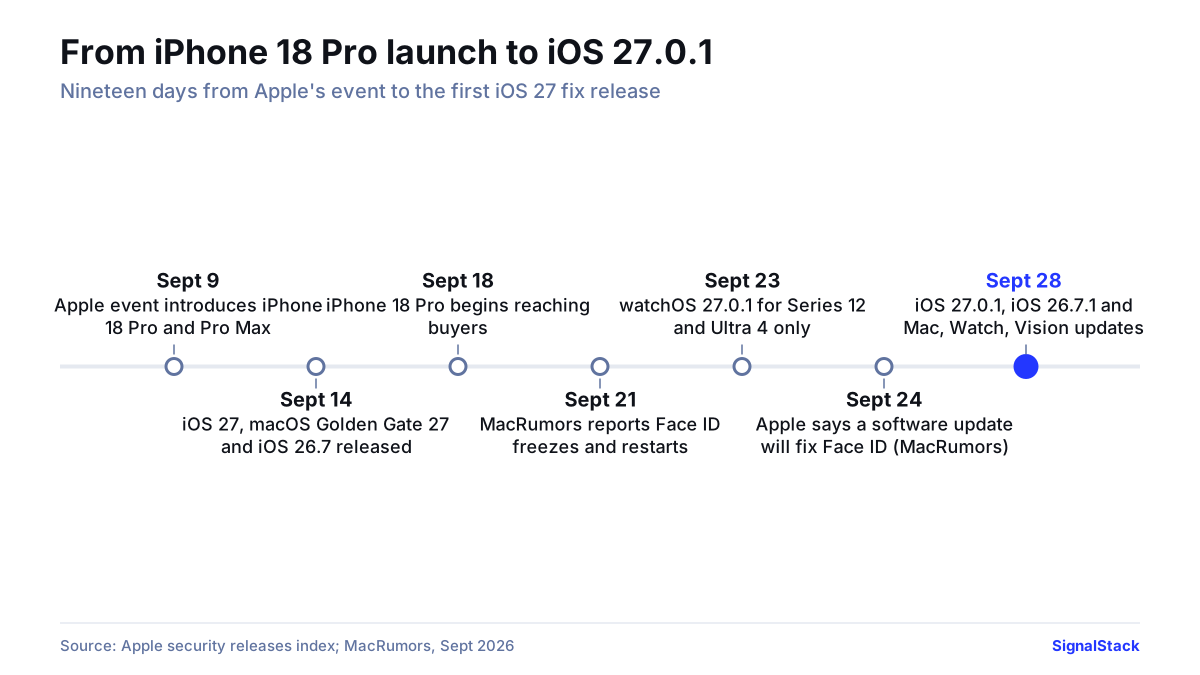
How to update and check your version
Apple’s support steps for iPhone and iPad are short. Back up with iCloud or a computer, plug the device in and join Wi-Fi, then open Settings > General > Software Update. That screen shows the installed version and any update on offer; tap Download and Install. Macs use System Settings > General > Software Update, and Vision Pro uses Settings > General > Software Update. Apple’s security index adds a caution: after an update, iOS, iPadOS, tvOS, watchOS and visionOS “cannot be downgraded to the previous version.”
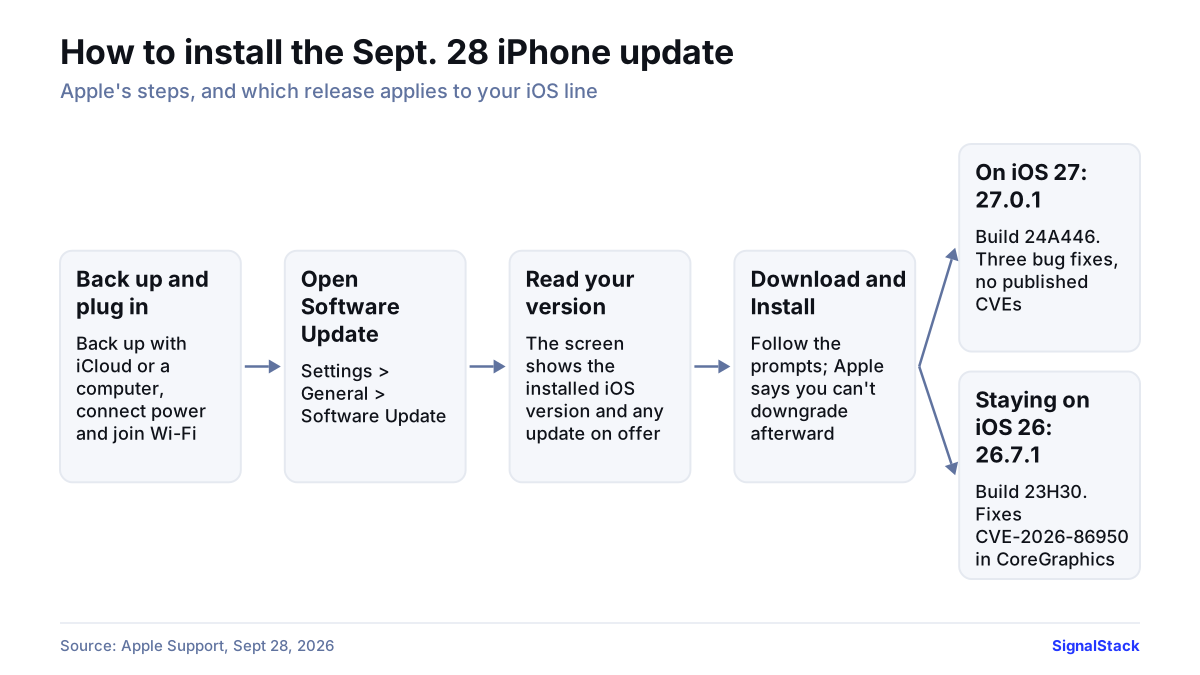
Apple’s security page calls keeping software current one of the most important steps for device security. Read plainly, its notes make iOS 27.0.1 a stability release and iOS 26.7.1 the one carrying the CoreGraphics fix Apple says may have been exploited.
Known issues reported after release
- Face ID on iPhone 18 Pro. YTechB reports that many owners say the freezing and crashing continue after 27.0.1. None of the sources we reviewed carried an Apple response.
- Unlisted changes. AppleInsider said at release that it was unclear exactly what each 27.0.1 update changed.
For more, see our note on macOS window-corner changes, the Apple company hub, and Tech & Security.
What could go right / What could go wrong
What could go right: The fixes end the Face ID restarts and touchscreen freezes, and older iPhones, iPads and Macs close CVE-2026-86950 quickly.
What could go wrong: If the YTechB reports hold, iPhone 18 Pro owners may need another point release. With the CoreGraphics flaw now public, unpatched iOS 26, Tahoe or Sequoia devices stay exposed, a risk MacRumors also flags. Apple has not said where iOS 18 stands.
FAQ
Q What does iOS 27.0.1 fix?
A Apple lists three fixes: iPhone 18 Pro and Pro Max restarting after a failed Face ID attempt, a color artifact in some 2x photos on a small number of those phones, and a touchscreen freeze on any iPhone when Notification Center and Control Center open together.
Q Is iOS 27.0.1 a security update?
A Not by Apple's labeling. Its security releases page says iOS 27.0.1 has no published CVE entries. The September 28 security fix, CVE-2026-86950 in CoreGraphics, shipped in iOS 26.7.1, macOS Tahoe 26.7.1 and macOS Sequoia 15.8.1.
Q Should I update to iOS 27.0.1?
A Apple's notes describe a bug-fix release, most relevant to iPhone 18 Pro owners. Apple calls keeping software current key to security; iPhones staying on iOS 26 get the CoreGraphics fix Apple says may have been exploited in 26.7.1.
Q What is the iOS 27.0.1 build number?
A iOS 27.0.1 and iPadOS 27.0.1 are build 24A446, and iOS 26.7.1 is build 23H30, according to iClarified, AppleInsider and Mr. Macintosh.
Q Was the CoreGraphics bug exploited?
A Apple's note reads: "Apple is aware of a report that this issue may have been exploited in an extremely sophisticated attack against specific targeted individuals on versions of iOS before iOS 27." It gives no further detail.
Companies in this report: Apple
Sources
- Apple security releases (index)
- About iOS 27 Updates (iOS 27.0.1 release notes)
- About the security content of iOS 26.7.1 and iPadOS 26.7.1
- About the security content of macOS Tahoe 26.7.1
- About the security content of macOS Sequoia 15.8.1
- About the security content of iOS 27 and iPadOS 27
- About the security content of iOS 26.7 and iPadOS 26.7
- Update your iPhone or iPad
- Apple Releases iOS 27.0.1 With Face ID Bug Fix
- iOS 26.7.1 Fixes Vulnerability Used in Targeted Attacks
- Some iPhone 18 Pro Users Experiencing Face ID Issues
- iOS 27 Update to Fix Face ID Issues on iPhone 18 Pro
- Apple releases iOS 27.0.1 for iPhone, here's what's new
- watchOS 27.0.1 is now available for all compatible Apple Watch models
- First urgent bug fixes arrive for macOS 27, iOS 27, iPadOS 27 and more
- Apple Releases iOS 27.0.1, iPadOS 27.0.1, and 26.7.1 Updates
- macOS Golden Gate 27.0.1 Update! Everything you need to know
- Apple releases iOS 27.0.1, but a major bug remains